Global Agent: One AI Assistant for Search, Docs and Support

From AI discovery and inventory to risk assessment and runtime enforcement, the Holistic AI Governance Platform creates a complete, auditable record of every AI system you use. But most people who need this information are not governance specialists. They work in legal, risk, procurement or product, and they may open the platform once a month. They should not have to learn the whole product to ask a simple question.
That is why we built the Global Agent. Now, anyone can find what they need just by asking.
One agent, three places
The Global Agent is an AI assistant built into the Holistic AI Governance Platform. It is one agent, not three separate tools. You meet the same agent in three places:
- The search bar, on every page of the platform.
- The documentation, where it answers questions from the platform manual.
- Help & Support, where it helps fix problems and raises tickets with our team.
Wherever you use it, the agent has the same knowledge and follows the same access rules. It knows your workspace, it knows the documentation, and it only shows you what your role allows you to see. The only thing that changes is the job you ask it to do.
In the search bar: find anything and ask anything
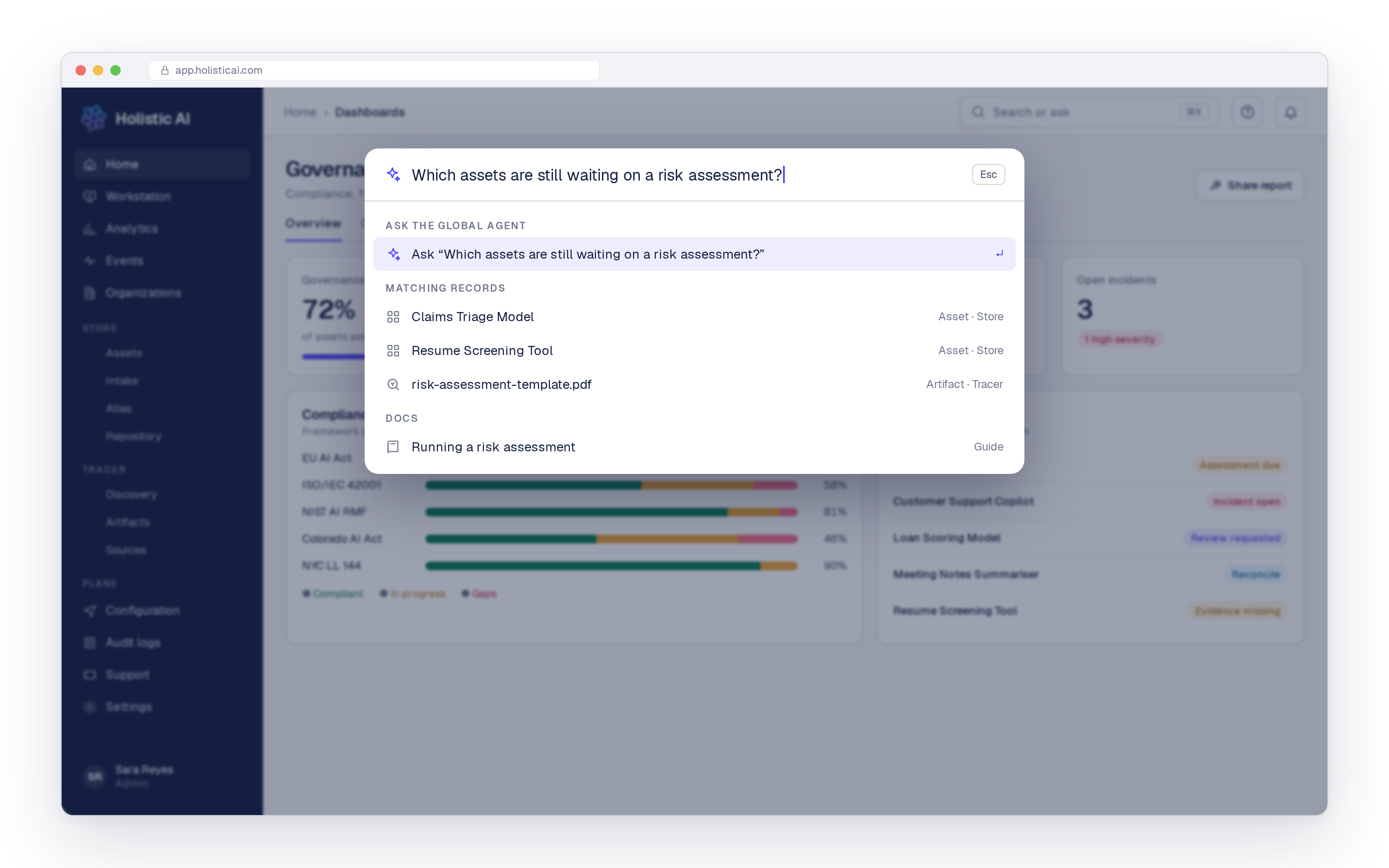
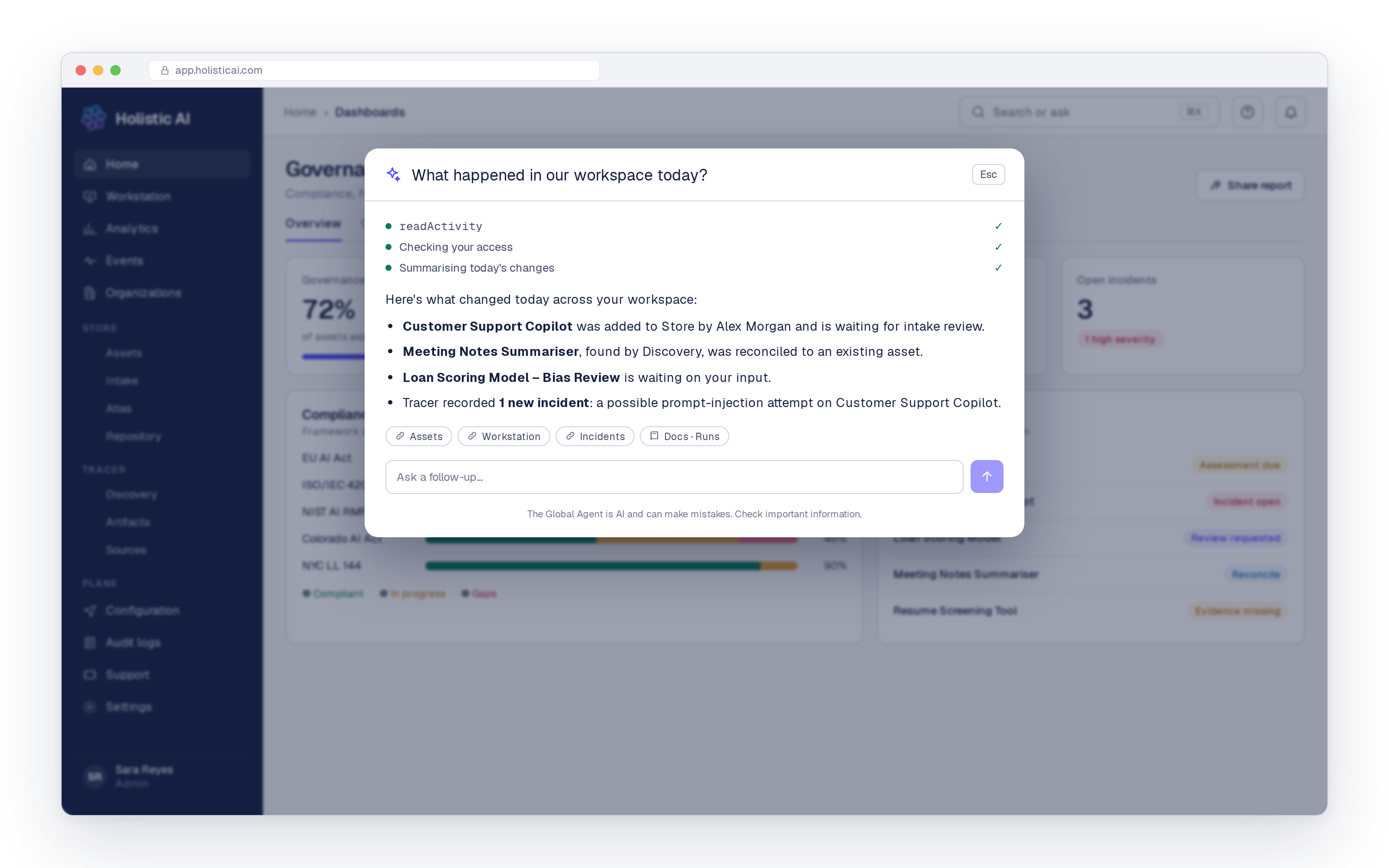
The search bar at the top of every page now says “Search or ask me anything”. This is the fastest way to reach the Global Agent.
Start typing a name and it works as a search. It suggests pages from across the platform and labels each one with the area it belongs to. You can jump to your Workstation, open an asset or an intake request, or go straight to Discovery, Artifacts or Sources. You no longer need to remember where something lives.
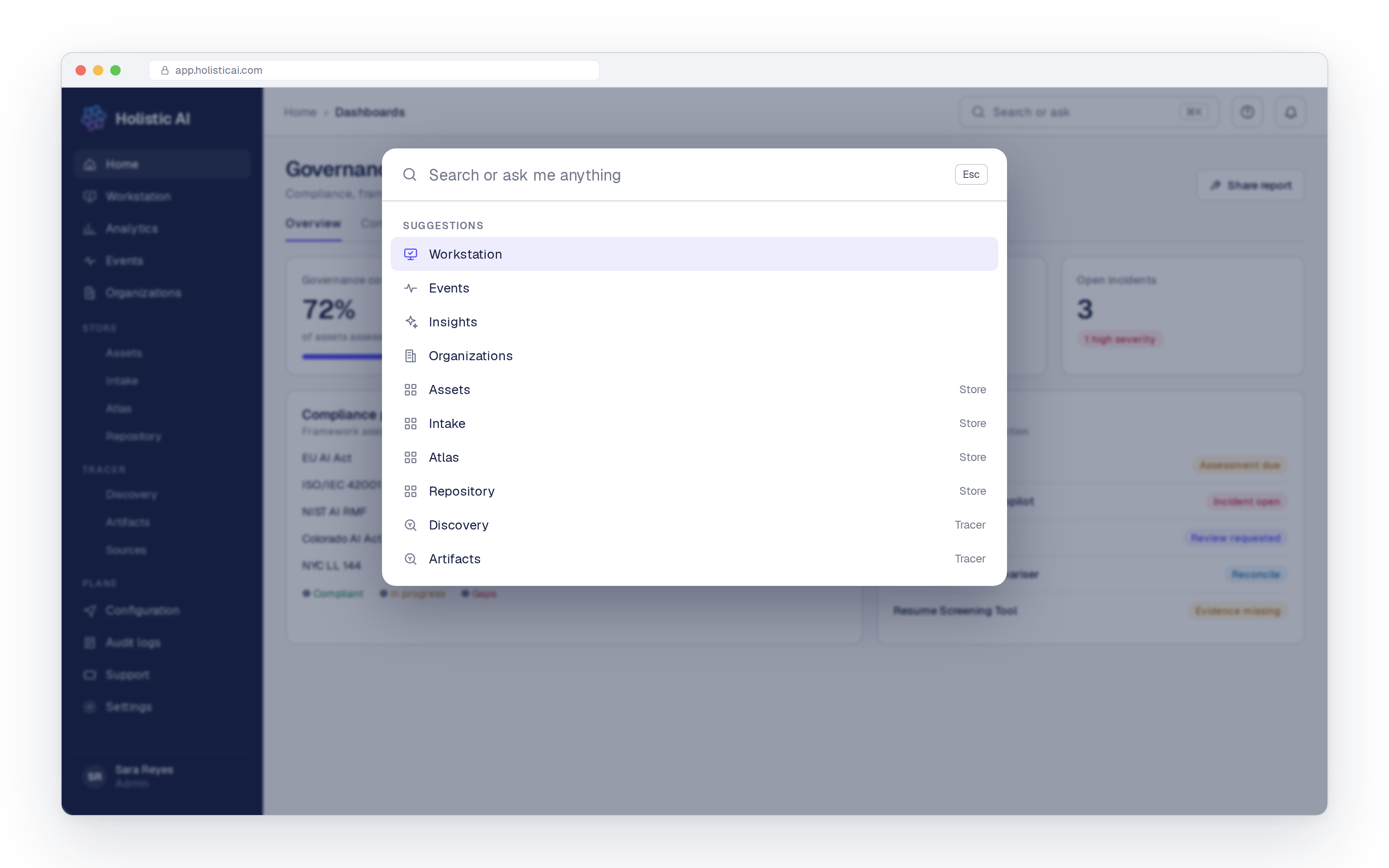
Type a question instead, and the agent answers it using live data from your workspace. For example, you can ask it to:
- Summarize what changed: New assets and who added them, Shadow AI items that were reconciled, and workflow runs that are waiting for your input.
- Find records. An asset, an artifact, an intake request or a workflow run, by name or by describing it. If you are not sure how assets and artifacts fit together, our guide to assets vs artifacts explains it.
- Check incidents. Incidents recorded by Guardian Agents, such as jailbreak attempts, prompt injection or possible data leakage.
- Take you there. Ask for a page and the agent opens it.
Every answer shows its working. Before it replies, the agent lists the steps it took, such as checking your access, reading recent activity or looking up the documentation. Each answer also links to the records it used. If you want to check a result, you can open the source in one click.
In governance, an answer is only useful if you can trace where it came from. The Global Agent always shows its steps and its sources.
In the documentation: answers from the platform manual
The full platform manual now lives inside the product. It covers everything from getting started and inviting your team to running red teaming, connecting integrations and setting up programmable controls. It is kept up to date with each release, and you can download it as a PDF.
The Global Agent is built into the documentation too. Choose Ask the docs and ask your question in plain words. Here, the agent answers only from the manual and cites the pages it used, so you can check every answer.
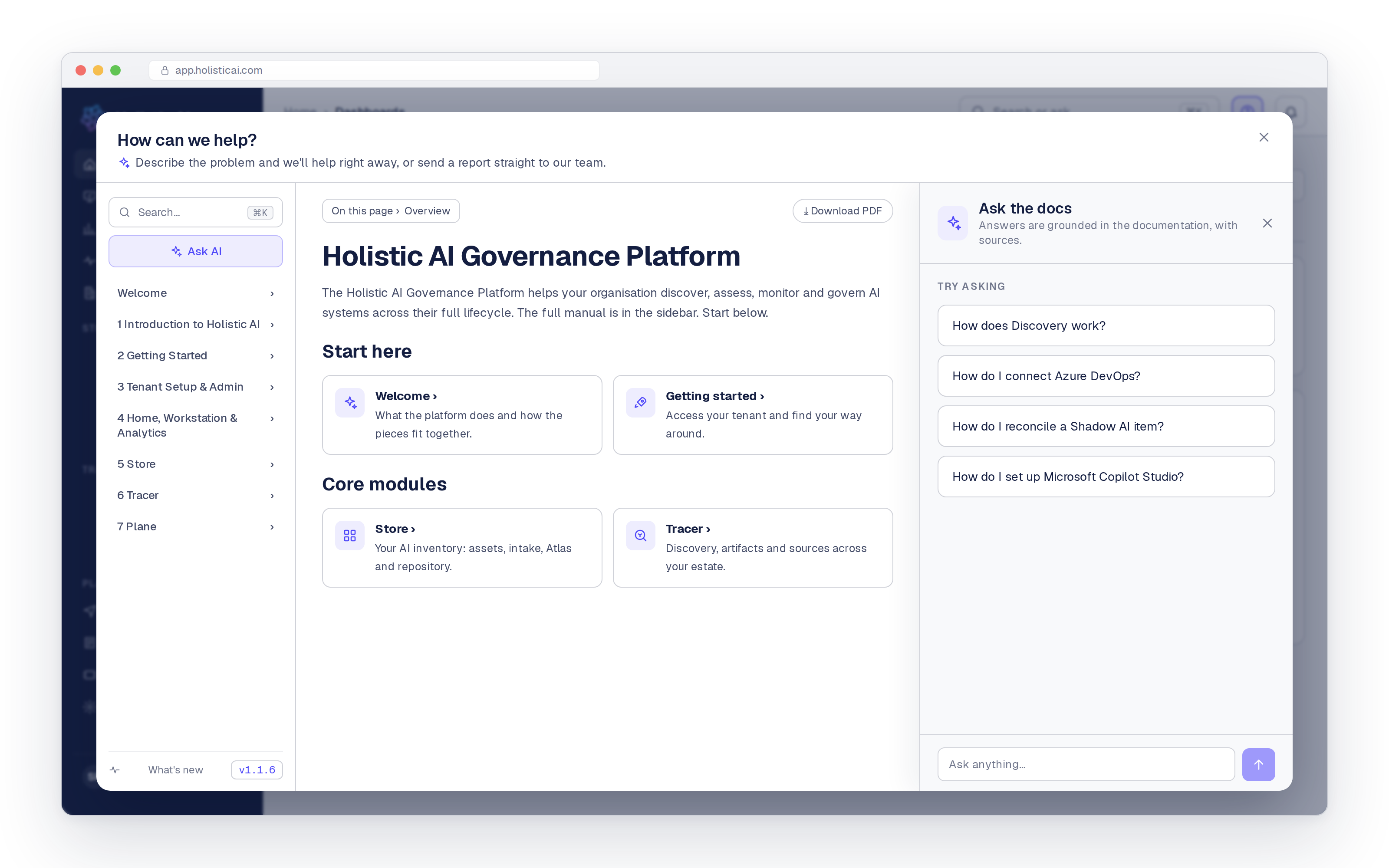
The agent can also find the right guide for you and open it next to its answer. Ask how to invite a teammate, for example, and it reads the manual, opens the page on inviting and managing users, and gives you the short version alongside it. You get the quick answer and the full detail at the same time.
This makes onboarding much easier. A new stakeholder can learn how to review an asset or map it to a framework by asking, instead of waiting for a training session.
In support: help first, then a complete ticket
Help & Support puts the documentation and the Global Agent side by side in one window. When something is not working, you describe the problem in your own words. The agent looks at the page you are on, checks the documentation and tries to solve the problem straight away.
If the agent cannot fix it, it writes the support ticket for you. The report includes:
- a subject and description based on your conversation
- the page where the problem happened
- a screenshot and the full conversation
- the urgency you choose
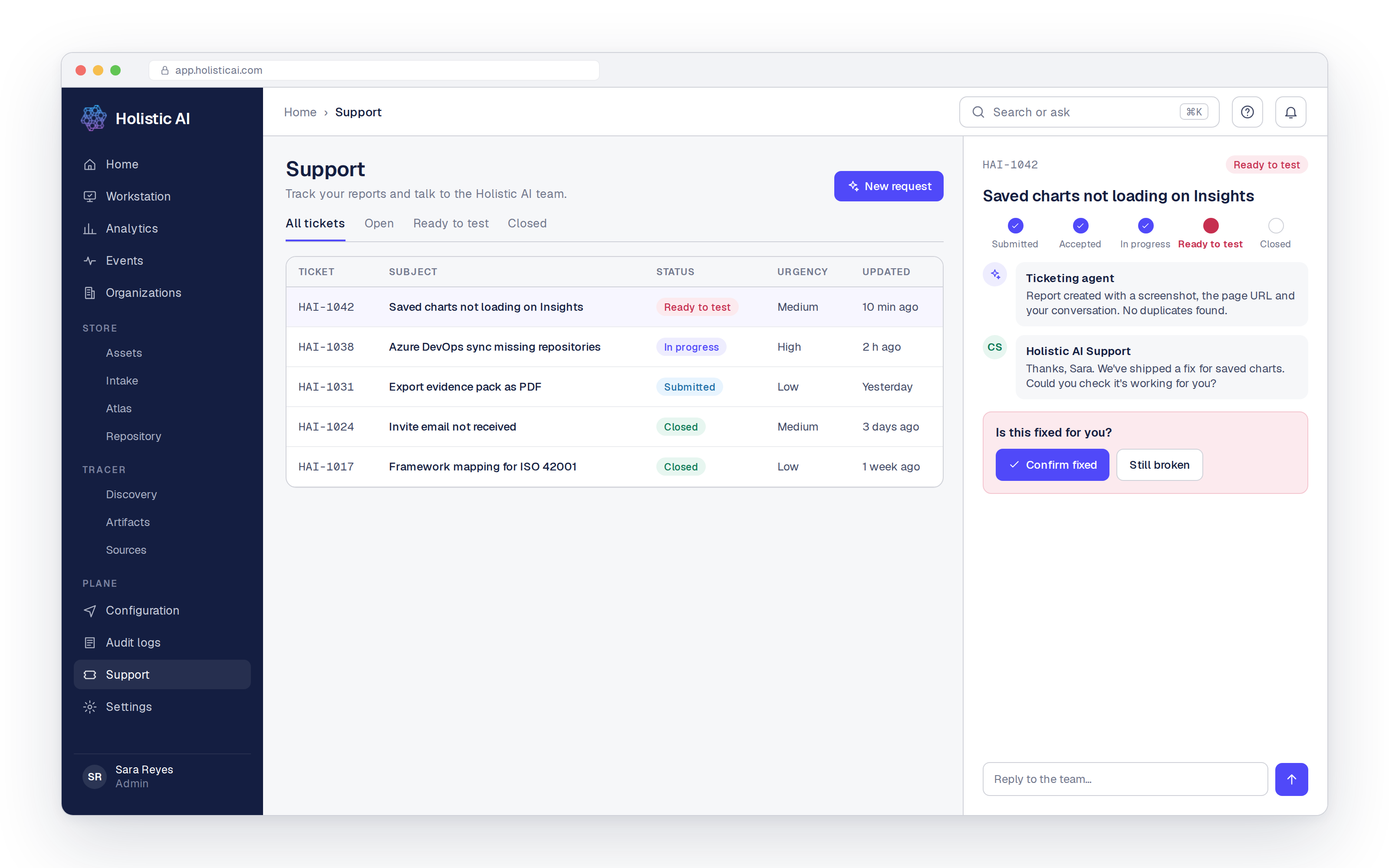
The ticket goes straight to the Holistic AI customer success team. The agent then keeps working in the background. It checks whether the problem has already been reported, reviews logs for useful details and adds what it finds to the ticket. By the time a person picks it up, most of the context is already there.
You can follow every ticket on the Support page and reply to our team from there. When a fix is ready, the ticket moves to Ready to test. You confirm that it works, or mark it as still broken so we keep looking.
How it works
The same HAI agent does three different jobs, depending on where you ask.
It only shows what you are allowed to see
The Global Agent follows the same access rules as the rest of the platform. It checks your role before it reads any data. If a team member has access to five assets, the agent will only ever answer questions about those five assets. This makes it safe to give the agent to everyone in the organization, not just administrators, and it supports good data governance.
The Global Agent also works alongside Insights, the analytics agent that administrators use to build charts and statistics. Use the Global Agent to find, ask and get help. Use Insights to analyze trends across the platform.
Why it matters
Different teams get different things from the Global Agent.
- Governance teams spend less time answering “where is it?” questions and more time on real governance work.
- New stakeholders in legal, risk, procurement and product can use the platform from day one without training.
- Security teams can open the platform to more people without exposing more data.
- Compliance teams get answers they can trace, backed by documentation that matches each release. This supports the audit trail that the EU AI Act, NIST AI RMF and ISO 42001 expect.
- Everyone gets faster support, because every ticket arrives with the full picture.
Technical details
- Availability: Holistic AI Governance Platform release v1.1.6.
- Where it appears: The search bar on every page, the in product documentation and Help & Support.
- Access: Available to every user. Answers follow each user’s role and permissions.
- Data it can use: Your workspace, including Workstation, assets, intake, artifacts, sources, workflows and incidents, plus the platform documentation.
- Transparency: Each answer shows the steps the agent took and links to its sources.
- Support tickets: Page, screenshot, conversation and urgency are captured automatically. Tickets move from Submitted to Accepted, In progress, Ready to test and Closed, and you confirm the fix.
Part of the Holistic AI Governance Platform
The Global Agent works across the whole of our AI governance platform. The assets it finds, the workflows it reports on and the incidents it surfaces are all part of one connected system, from AI discovery and inventory to testing, compliance and runtime monitoring, across the full IDENTIFY, PROTECT and ENFORCE lifecycle.
One agent. Every answer, one question away.
Want to see the Global Agent in action? Get a demo.